软件各种广告去除通用方法 100%成功 [详细篇]

[复制链接]
查看3453 | 回复13 | 2024-11-21 15:36:22 | 显示全部楼层 |阅读模式

立即注册,突破游客限制,与技术大牛交流切磋,畅享海量资源,让你的技术之路不再孤单!

您需要 登录 才可以下载或查看,没有账号?立即注册

×
本帖最后由 洋咩咩 于 2024-11-21 16:05 编辑

1. 去除广告思路
1.1 Android 广告
1.1.1 Android 中的广告形式
广告的表现形式很多,可能是一个界面(activity),可能是局部在上方或下方的一个区域视图(view)等。以下是常见广告形式:
嵌入式广告:将广告直接嵌入到应用程序中,通常出现在应用程序的底部、顶部或侧边栏。
插页式广告:应用程序的某个时间点弹出的广告,通常会覆盖整个屏幕。插页式广告通常在应用程序的特定事件之后出现,例如游戏中的关卡结束或应用程序的主菜单页面。
横幅广告:在应用程序的顶部或底部显示的广告,通常以图像或文本的形式出现。横幅广告通常比嵌入式广告小,不会占用应用程序的太多空间。
视频广告:在应用程序中播放的广告,通常以全屏或插页式的形式出现。通常需要观看一段时间才能跳过或关闭。


  1. 1. 嵌入式广告布局
  2. ```xml
  3. <! activity_main.xml 原始布局 >
  4. <LinearLayout
  5.     android:layout_width="match_parent"
  6.     android:layout_height="match_parent"
  7.     android:orientation="vertical">
  8.    
  9.     <! 原始内容区域 >
  10.     <LinearLayout
  11.         android:id="@+id/content_container"
  12.         android:layout_width="match_parent"
  13.         android:layout_height="0dp"
  14.         android:layout_weight="1">
  15.         <! 应用主体内容 >
  16.     </LinearLayout>
  17.    
  18.     <! 广告位置  底部嵌入 >
  19.     <com.google.android.gms.ads.AdView
  20.         android:id="@+id/adView"
  21.         android:layout_width="match_parent"
  22.         android:layout_height="wrap_content"
  23.         android:layout_gravity="bottom"
  24.         ads:adSize="BANNER"
  25.         ads:adUnitId="@string/ad_unit_id"/>
  26. </LinearLayout>
  27. ```
  28. 2. 插页式广告布局
  29. ```java
  30. public class MainActivity extends AppCompatActivity {
  31.     private InterstitialAd mInterstitialAd;
  32.    
  33.     @Override
  34.     protected void onCreate(Bundle savedInstanceState) {
  35.         super.onCreate(savedInstanceState);
  36.         setContentView(R.layout.activity_main);
  37.         // 插页式广告加载逻辑
  38.         loadInterstitialAd();
  39.     }
  40.     private void loadInterstitialAd() {
  41.         // 在特定事件触发广告
  42.         AdRequest adRequest = new AdRequest.Builder().build();
  43.         InterstitialAd.load(this, "ad_unit_id", adRequest,
  44.             new InterstitialAdLoadCallback() {
  45.                 @Override
  46.                 public void onAdLoaded(@NonNull InterstitialAd interstitialAd) {
  47.                     mInterstitialAd = interstitialAd;
  48.                     // 设置广告展示监听
  49.                     setupInterstitialAdListener();
  50.                 }
  51.             });
  52.     }
  53.     private void setupInterstitialAdListener() {
  54.         // 监听广告关闭事件
  55.         mInterstitialAd.setFullScreenContentCallback(
  56.             new FullScreenContentCallback() {
  57.                 @Override
  58.                 public void onAdDismissedFullScreen() {
  59.                     // 广告关闭后的处理
  60.                 }
  61.             }
  62.         );
  63.     }
  64.     // 触发显示插页广告的方法
  65.     private void showInterstitialAd() {
  66.         if (mInterstitialAd != null) {
  67.             // 直接覆盖整个屏幕
  68.             mInterstitialAd.show(this);
  69.         }
  70.     }
  71. }
  72. ```
  73. 3. 横幅广告布局
  74. ```xml
  75. <! 横幅广告可以有多种布局方式 >
  76. <! 方式1:底部横幅 >
  77. <RelativeLayout
  78.     android:layout_width="match_parent"
  79.     android:layout_height="match_parent">
  80.    
  81.     <! 主内容区域 >
  82.     <FrameLayout
  83.         android:id="@+id/main_content"
  84.         android:layout_width="match_parent"
  85.         android:layout_height="match_parent"
  86.         android:layout_above="@+id/banner_ad_container">
  87.     </FrameLayout>
  88.    
  89.     <! 广告容器 >
  90.     <LinearLayout
  91.         android:id="@+id/banner_ad_container"
  92.         android:layout_width="match_parent"
  93.         android:layout_height="wrap_content"
  94.         android:layout_alignParentBottom="true">
  95.         
  96.         <com.google.android.gms.ads.AdView
  97.             android:id="@+id/adView"
  98.             android:layout_width="match_parent"
  99.             android:layout_height="wrap_content"
  100.             ads:adSize="BANNER"
  101.             ads:adUnitId="@string/ad_unit_id"/>
  102.     </LinearLayout>
  103. </RelativeLayout>
  104. <! 方式2:顶部横幅 >
  105. <LinearLayout
  106.     android:layout_width="match_parent"
  107.     android:layout_height="match_parent"
  108.     android:orientation="vertical">
  109.    
  110.     <! 顶部广告 >
  111.     <com.google.android.gms.ads.AdView
  112.         android:id="@+id/top_adView"
  113.         android:layout_width="match_parent"
  114.         android:layout_height="wrap_content"
  115.         ads:adSize="BANNER"
  116.         ads:adUnitId="@string/top_ad_unit_id"/>
  117.    
  118.     <! 主内容区域 >
  119.     <FrameLayout
  120.         android:id="@+id/main_content"
  121.         android:layout_width="match_parent"
  122.         android:layout_height="0dp"
  123.         android:layout_weight="1">
  124.     </FrameLayout>
  125. </LinearLayout>
  126. ```
  127. 4. 视频广告布局
  128. ```java
  129. public class VideoAdActivity extends AppCompatActivity {
  130.     private RewardedAd mRewardedAd;
  131.     @Override
  132.     protected void onCreate(Bundle savedInstanceState) {
  133.         super.onCreate(savedInstanceState);
  134.         setContentView(R.layout.activity_main);
  135.         // 加载激励视频广告
  136.         loadRewardedAd();
  137.     }
  138.     private void loadRewardedAd() {
  139.         AdRequest adRequest = new AdRequest.Builder().build();
  140.         RewardedAd.load(this, "ad_unit_id", adRequest,
  141.             new RewardedAdLoadCallback() {
  142.                 @Override
  143.                 public void onAdLoaded(@NonNull RewardedAd rewardedAd) {
  144.                     mRewardedAd = rewardedAd;
  145.                     
  146.                     // 配置广告监听
  147.                     mRewardedAd.setFullScreenContentCallback(
  148.                         new FullScreenContentCallback() {
  149.                             @Override
  150.                             public void onAdDismissedFullScreen() {
  151.                                 // 广告关闭处理
  152.                             }
  153.                         }
  154.                     );
  155.                 }
  156.             });
  157.     }
  158.     // 触发全屏视频广告
  159.     private void showRewardedVideoAd() {
  160.         if (mRewardedAd != null) {
  161.             // 直接覆盖整个屏幕
  162.             mRewardedAd.show(this, new OnUserEarnedRewardListener() {
  163.                 @Override
  164.                 public void onUserEarnedReward(@NonNull RewardItem rewardItem) {
  165.                     // 奖励处理
  166.                 }
  167.             });
  168.         }
  169.     }
  170. }
  171. ```
  172. 广告布局的核心实现原理:
  173. 1. 布局嵌入:通过在原始布局中预留广告位置,使用 `AdView` 或者特定的广告容器控件
  174. 2. 动态插入:可以通过代码动态添加广告视图到现有布局中
  175. 3. 层级关系:
  176.     嵌入式广告:作为布局的一部分
  177.     插页式广告:覆盖整个屏幕
  178.     横幅广告:通常位于内容上方或下方
  179.     视频广告:全屏展示
复制代码

1.1.2 Android 广告来源
Push 推送广告:通过推送消息到用户设备通知栏上展示广告。
第三方 SDK 广告:很多应用都会集成第三方广告平台,比如 AdMob、Facebook Audience Network、Unity Ads 等等,应用程序可以用第三方广告 SDK 来从其他公司的广告库中获取广告并在应用程序中展示。

1.2 Android 去除广告思路
无论怎样形式、怎样来源的广告,在本地一定需要展示出来,展示就需要广告内容载体,如界面、视图等,对于这些容器,即可以利用静态的布局,也可以动态生成布局。如果能移除这些容器、或者破坏容器生成条件就可以达到去广告的地步。

对于静态布局的广告:广告图片视频都是保存在apk里的,只需要直接从配置清单 xml 文件,或相应的布局xml文件入手,修改容器的布局或者删除相应的代码,就可去除广告。
对于动态导入第三方SDK的广告:我们就需要从代码逻辑上入手。找到它动态导入广告的地方,尝试修改判断条件,从而使导入广告失败,或者让广告无法显示,从而去除广告。

本次案例是来自于第三方 SDK 软件的广告投放,通过发送请求包,从而获取相对应的广告 ID 与资源,对于这种情况,我们可以通过定位 SDK 的初始化、广告请求、广告展示等代码,来分析其逻辑,从而找到突破点。


2. 分析开屏广告
2.1 分析步骤
2.1.1 分析广告页面
截图202411211542299297.png
首先对开屏广告页面进行分析,通过MT管理器发现该广告是处在 WelcomeActivity 类中,我们直接hook 类,得到其函数调用栈。
截图202411211542562240.png
2.1.2 分析启动时函数调用栈
可以猜测 showHomePage() 就是展示我们的主页了,我们逐条分析广告发生前的函数:

  1. private void checkPermission() {
  2.     if (lpt2.br(InitHelper.getInstance().checkInitPermission(this))) {
  3.         jumpToMain();
  4.         return;
  5.     }
  6.     List<String> checkInitPermission = InitHelper.getInstance().checkInitPermission(this);
  7.     androidx.core.app.aux.a(this, (String[]) checkInitPermission.toArray(new String[checkInitPermission.size()]), 1);
  8. }
  9. // 检查初始化权限
  10. public List<String> checkInitPermission(Context context) {
  11.     ArrayList<String> arrayList = new ArrayList();
  12.     ArrayList arrayList2 = new ArrayList();
  13.     arrayList.add("android.permission.INTERNET");   // 访问网络的权限
  14.     if (!org.qiyi.speaker.u.con.bMX()) {
  15.         arrayList.add("android.permission.READ_PHONE_STATE");    // 取手机状态的权限
  16.     }
  17.     arrayList.add("android.permission.WRITE_EXTERNAL_STORAGE");   // 写入外部存储设备的权限
  18.     arrayList.add("android.permission.ACCESS_NETWORK_STATE");    // 访问网络状态的权限
  19.     ....
  20. }
  21. private void jumpToMain() {
  22.     Log.e("gzy", "size:" + SpeakerApplication.getInstance().getCurrentActivitySize());
  23.         // 用户是否给软件授权
  24.     if (!org.qiyi.speaker.o.con.bLa()) {
  25.         org.qiyi.speaker.o.con.a(this, this.mLisenceCallback);  // 显示免责声明并进行用户许可
  26.         // 加载splash启动页动画(没有后台进程)
  27.     } else if (GuideController.INSTANCE.needShowSplashGuide()) {
  28.         showGuidePage();
  29.     } else {
  30.                 //
  31.         launchMain(false);
  32.     }
  33. }
  34. // 首次打开,启动应用程序主界面
  35. public void launchMain(final boolean z) {
  36.         // 如果当前Activity数量不等于1,那么显示主页。
  37.     if (SpeakerApplication.getInstance().getCurrentActivitySize() != 1) {
  38.         showHomePage(z);
  39.         return;
  40.     }
  41.         // 注册一个启动画面的回调,请求广告并下载,当启动画面结束后, 显示广告。
  42.     com.qiyi.video.g.con.aXh().registerSplashCallback(new ISplashCallback() { // from class: com.qiyi.video.speaker.activity.WelcomeActivity.2
  43.         @Override // org.qiyi.video.module.api.ISplashCallback
  44.         public void onAdAnimationStarted() {
  45.         }
  46.         @Override // org.qiyi.video.module.api.ISplashCallback
  47.         public void onAdCountdown(int i) {
  48.         }
  49.         @Override // org.qiyi.video.module.api.ISplashCallback
  50.         public void onAdOpenDetailVideo() {
  51.         }
  52.         @Override // org.qiyi.video.module.api.ISplashCallback
  53.         public void onAdStarted(String str) {
  54.         }
  55.         @Override // org.qiyi.video.module.api.ISplashCallback
  56.         public void onSplashFinished(int i) {
  57.             WelcomeActivity.this.showHomePage(z);
  58.             JobManagerUtils.a(new Runnable() { // from class: com.qiyi.video.speaker.activity.WelcomeActivity.2.1
  59.                 @Override // java.lang.Runnable
  60.                 public void run() {
  61.                     com.qiyi.video.qysplashscreen.ad.aux.aUv().aUE();
  62.                     ((ISplashScreenApi) ModuleManager.getModule(IModuleConstants.MODULE_NAME_SPLASH_SCREEN, ISplashScreenApi.class)).requestAdAndDownload();
  63.                 }
  64.             }, 500, PageAutoScrollUtils.HANDLER_SWITCH_NEXT_TIPS_DELAY, "splashAD_requestad", WelcomeActivity.TAG);
  65.         }
  66.     });
  67.     launchAppGuide();
  68. }
复制代码


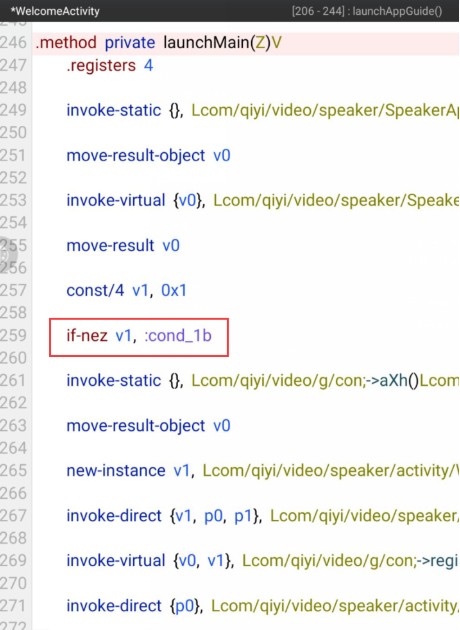
2.1.3 修改 if 判断
可以看到当当前Activity数量不等于1时,就直接调 showHomePage 函数,我们可以将这个判断改为永真,让其直接显示主页。
截图202411211543505298.png

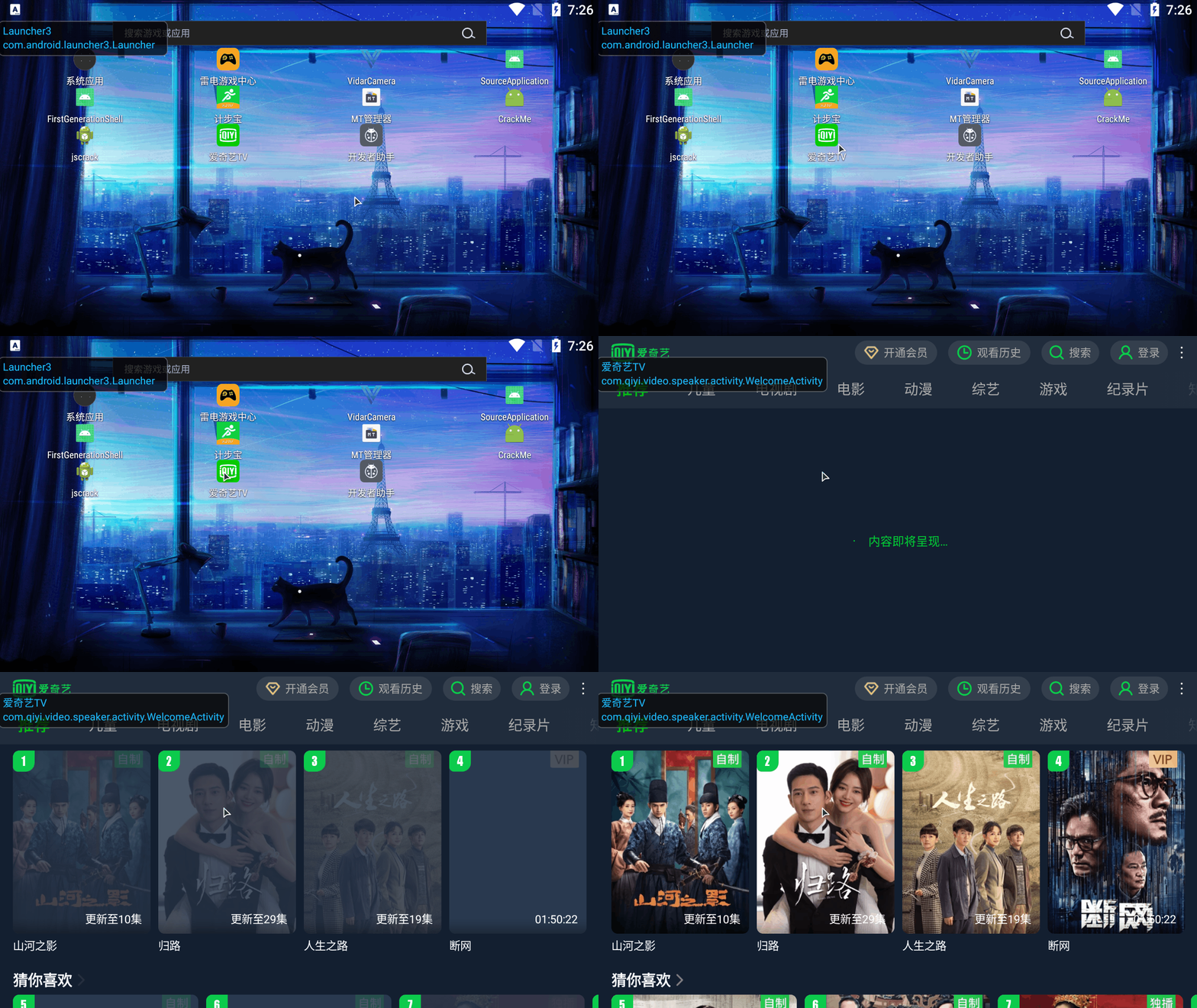
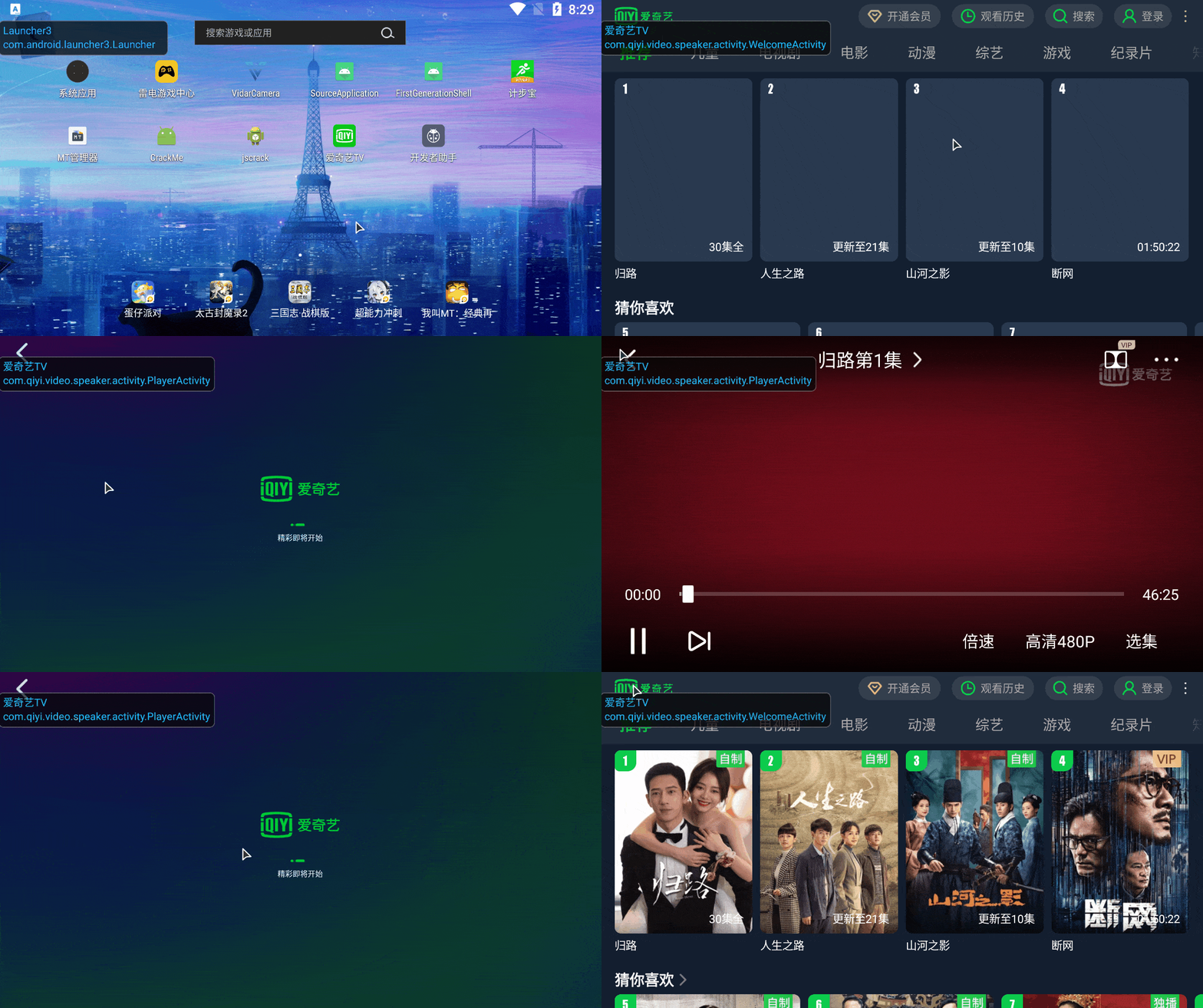
重打包编译签名,运行程序,已去除开屏广告:
939796_B23W2Y2PV8XN969.gif
2.3 总结
对于开屏广告,我们可以观察应用启动的 Acitivity 顺序 (先从主入口切入Main),寻找其函数调用顺序,找到其播送广告的页面,将其逻辑更改,就可以屏蔽掉开屏广告。


3. 分析播放视频广告
3.1 分析步骤
3.1.1 分析广告页面
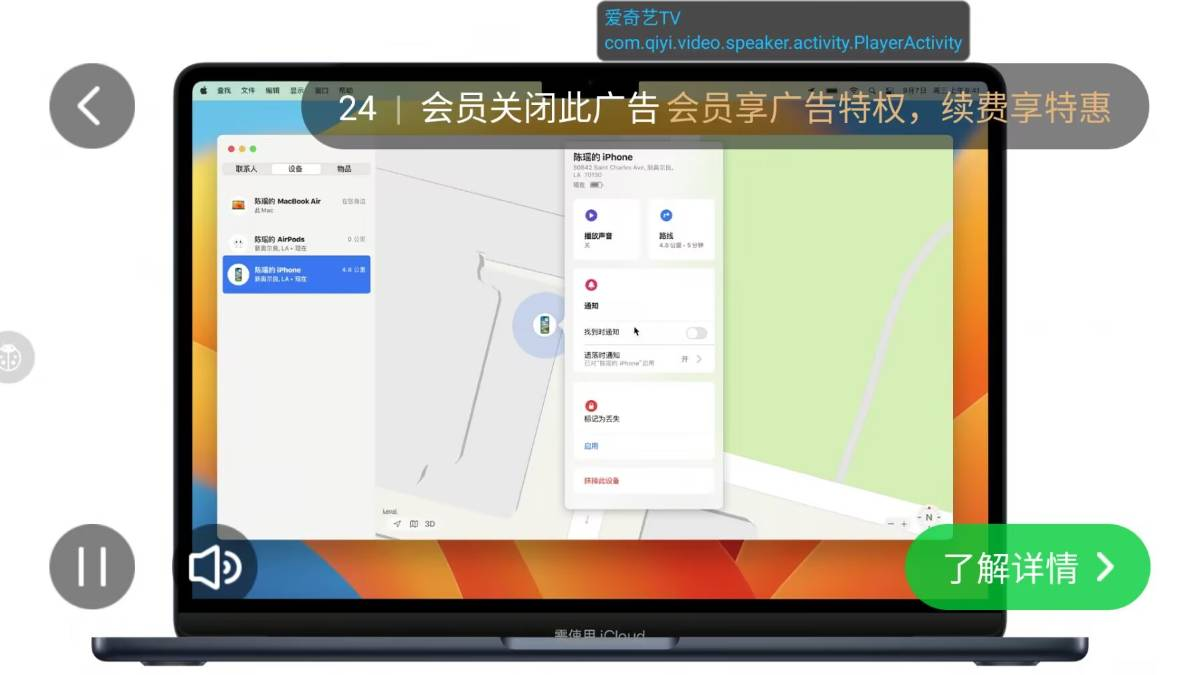
截图202411211550457201.png

首先对视频广告页面进行分析,有暂停键、静音键、详情键、持续时间、会员关闭提示…,我们可以想到:

剩余时间:获取广告时长,并设置计时器(可能会有判断时间归零,结束视频)
了解详情:获取广告 ID,设置按钮监听,保存广告详情 url
暂停键:保留当前广告播放位置
……

3.1.2 分析持续时间
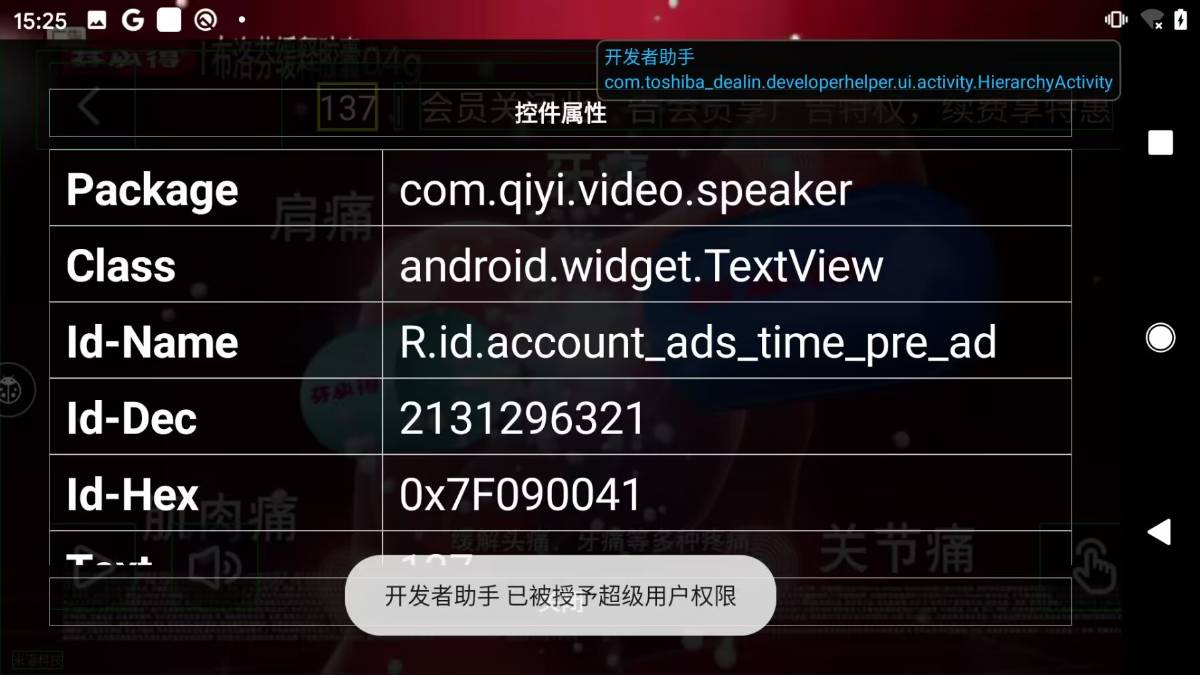
本人选择剩余时间作为破解入口,通过开发者助手查到显示时间的资源 ID 是 R.id.account_ads_time_pre_ad,搜索资源ID可得三处引用该资源。

截图202411211551109735.png
截图202411211551242275.png

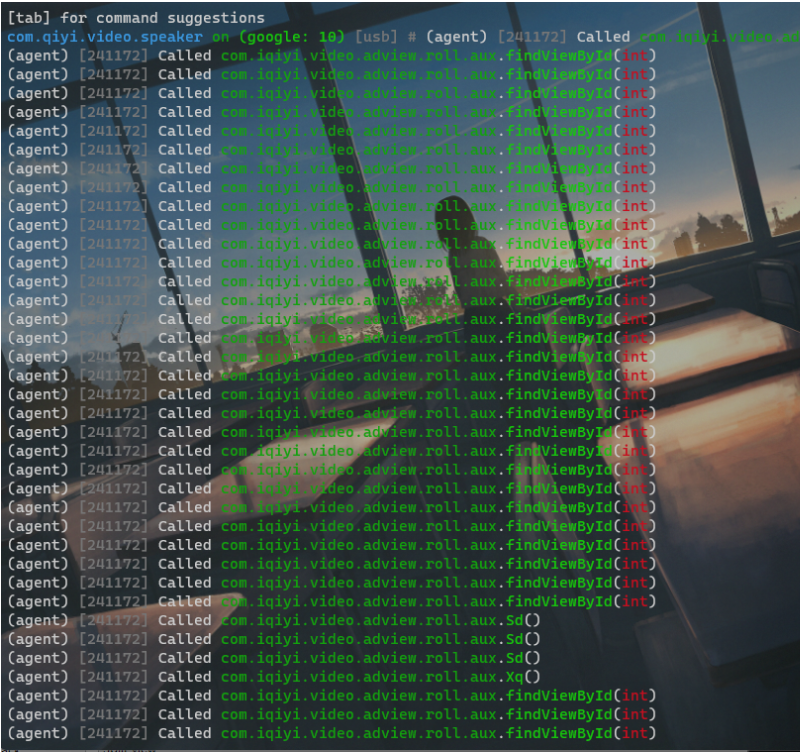
通过 hook 分析发现在视频启动时的广告,调用的是 aux 类的函数:
截图202411211551586278.png

分析 aux 类里使用了R.id.account_ads_time_pre_ad 的方法,找到三处,分别分析:

第一、二处均用在 Xi() 函数中,该函数主要设置广告配置及布置广告界面。

  1. private void Vz() {
  2.         ......
  3.         this.bPB = (TextView) findViewById(R.id.account_ads_time_pre_ad);
  4. }
  5. private void Xi() {
  6.     ...
  7.     // 获取当前广告播放器的状态
  8.     BaseState currentState = this.mAdInvoker.getCurrentState();   
  9.     // 获取了广告播放器的UI策略
  10.     int adUIStrategy = this.mAdInvoker.getAdUIStrategy();      
  11.     // 打印日志
  12.     com.iqiyi.video.qyplayersdk.g.aux.i("PLAY_SDK_AD_ROLL", "{GPhoneRollAdView}", " show ad UI, current state = ", currentState, ", adUiStrategy: ", Integer.valueOf(adUIStrategy));
  13.     // 设置视图的背景,根据当前广告播放器的状态来选择不同的背景资源
  14.     this.bPy.setBackgroundResource(currentState.isOnPaused() ? R.drawable.qiyi_sdk_play_ads_player : R.drawable.qiyi_sdk_play_ads_pause);
  15.     // 获取了当前广告的交付类型
  16.     int i = this.mDeliverType;
  17.     boolean z = i == 3 || i == 7 || i == 4;
  18.     // 获取广告播放器配置
  19.     QYPlayerADConfig adConfig = this.mAdInvoker.getAdConfig();
  20.     int i2 = 8;
  21.     // 根据UI策略的不同值,来设置一些视图的可见性或执行一些方法,8不可见,0可见
  22.     if (adUIStrategy == 1) {
  23.         this.bPA.setVisibility(8);
  24.         this.bPy.setVisibility(8);
  25.         this.bPF.setVisibility(8);
  26.         this.bPz.setVisibility(8);
  27.     } else if (adUIStrategy == 2) {
  28.         this.bPA.setVisibility(8);
  29.         this.bPy.setVisibility(8);
  30.         this.bPz.setVisibility(8);
  31.         this.bSv.setVisibility(8);
  32.         this.bSq.setVisibility(8);
  33.         this.bSq.setOnTouchListener(null);
  34.     } else if (adUIStrategy == 3) {
  35.         this.bPA.setVisibility(8);
  36.         this.bPF.setVisibility(8);
  37.         boolean isMute = isMute();      // 检查广告是否处于静音状态
  38.         this.bPL = isMute;
  39.         setAdMute(isMute, false);
  40.     } else {
  41.         this.bPF.setVisibility(0);
  42.         TextView textView = this.bPA;
  43.         if (!this.mIsLand) {
  44.             i2 = 0;
  45.         }
  46.         textView.setVisibility(i2);
  47.         boolean isMute2 = isMute();
  48.         this.bPL = isMute2;
  49.         setAdMute(isMute2, false);
  50.         Xk();
  51.     }
  52.     if (this.mDeliverType != 6) {
  53.         this.bPB.setVisibility(0);     // 设置时间视图可显
  54.     }
  55.     this.bPB.setText(String.valueOf(this.mAdInvoker.getAdDuration()));     // 给时间视图赋值
  56. }
复制代码
第三处位于 Xc() 函数中,根据 hook 到的函数调用栈,分析其运行过程:
截图202411211552397967.png
  1. public void Xc() {
  2.     // 获取广告播放时长
  3.     int adDuration = this.mAdInvoker.getAdDuration();   
  4.     String str = adDuration + "";
  5.     ...
  6.     jv(adDuration);    // 判断能不能跳过广告
  7.     if (XE()) {
  8.         XH();
  9.     }
  10.     TextView textView = this.bPB;    // 设置剩余时间
  11.     if (textView != null) {
  12.         textView.setText(str);    // 显示非VIP持续时间
  13.     }
  14.     int i = this.mDeliverType;
  15.     if (i == 3 || i == 7) {    // 如果交付类型是3或7 (VIP广告),广告持续时间小于1,调用dz(false)
  16.         if (adDuration < 1) {
  17.             dz(false);   
  18.         } else {
  19.             this.bSA.setText(str);     // 显示VIP持续时间
  20.         }
  21.     }
  22.     if (this.mDeliverType == 2) {     // 允许跳过的广告
  23.         int Xp = Xp();    // 广告可跳过的剩余时间
  24.         if (Xp < 1) {    // 允许跳过
  25.             Xl();    // 显示跳过按钮
  26.         } else {
  27.             this.bSG.setText(this.mContext.getString(R.string.trueview_accountime, Integer.valueOf(Xp)));
  28.         }
  29.     }
  30.     // 省流:根据不同的交付类型,为不同类型的广告进行时间配置与视图是否可显操作
  31.     ...
  32. }
  33. // 处理广告的交互时间限制逻辑
  34. private void jv(int i) {
  35.     // 判断是否为触摸广告,是否支持点击跳转,并且是否已经被点击过
  36.     if (!this.bOR.isTouchAd() || this.bOR.getClickThroughType() != 0 || this.bTn) {
  37.         return;   // 是,直接返回
  38.     }
  39.     // 获取广告的预览信息
  40.     PreAD creativeObject = this.bOR.getCreativeObject();
  41.     // getInterTouchTime()是广告中点击交互的时间间隔,返回 10,表示用户需要等待至少 10 秒之后才能进行一次点击交互。小于0,说明可以点击。
  42.     // 后面一个条件是指当前时间加上最早允许交互的时间点,如果超过广告总时长,则不允许交互,比如总时长120秒,getInterTouchTime() 返回 40,当前时间为100秒,大于总时长,不允许交互。
  43.     if (creativeObject.getInterTouchTime() <= -1 || i + creativeObject.getInterTouchTime() > this.bTp) {
  44.         return;
  45.     }
  46.     // 重置广告界面,继续播放
  47.     this.bSq.reset();
  48.     Wu();
  49. }
  50. // 判断当前广告是创意广告
  51. private boolean XE() {
  52.     CupidAD<PreAD> cupidAD = this.bOR;
  53.     if (cupidAD == null || cupidAD.getCreativeObject() == null) {
  54.         return false;
  55.     }
  56.     return this.bOR.getDeliverType() == 10 || this.bOR.getDeliverType() == 11;
  57. }
  58. // 计算广告可跳过的剩余时间
  59. private int Xp() {
  60.     if (this.bOR.getDeliverType() != 2) {
  61.         return 0;
  62.     }
  63.     return (this.bOR.getSkippableTime() / 1000) - ((this.bOR.getDuration() / 1000) - this.mAdInvoker.getAdDuration());
  64. }
  65. 上面两个函数都是对布局文件进行操作,设置其 text 或者是否可显,并没有判断去掉广告的地方,我们还有继续寻找。
  66. 对比两个函数发现,获取持续时间的函数是 getAdDuration(),我们去寻找该函数声明,发现在 com.iqiyi.video.qyplayersdk.player.QYMediaPlayerProxy 类中:
  67. public int getAdDuration() {
  68.     com.iqiyi.video.qyplayersdk.core.com1 com1Var = this.mPlayerCore;
  69.     if (com1Var == null) {
  70.         return 0;
  71.     }
  72.     return com1Var.getAdsTimeLength();
  73. }
  74. // 位于 com.iqiyi.video.qyplayersdk.core.QYBigCorePlayer 类中
  75. public int getAdsTimeLength() {
  76.     com8 com8Var = this.pumaPlayer;
  77.     if (com8Var != null) {
  78.         return Math.round(com8Var.GetADCountDown() / 1000.0f);   // 转成整数
  79.     }
  80.     return 0;
  81. }
  82. // com.mcto.player.nativemediaplayer.NativeMediaPlayer 类中
  83. public int GetADCountDown() {
  84.     int GetADCountDown;
  85.     if (IsCalledInPlayerThread()) {      // 判断是否在播放器线程中调用
  86.         return this.native_media_player_bridge.GetADCountDown();    // 获取广告持续时间
  87.     }
  88.     synchronized (this) {
  89.         if (!this.native_player_valid) {     // 判断播放器是否合法
  90.             throw new MctoPlayerInvalidException(puma_state_error_msg);
  91.         }
  92.         GetADCountDown = this.native_media_player_bridge.GetADCountDown();
  93.     }
  94.     return GetADCountDown;
  95. }
  96. // com.mcto.player.nativemediaplayer.NativeMediaPlayerBridge 类中
  97. public int GetADCountDown() {
  98.         // 调用了一个指定ID为43的方法,该方法返回一个JSON格式的字符串,其中包含有关广告信息的数据
  99.     String InvokeMethod = InvokeMethod(43, "{}");
  100.     if (InvokeMethod.isEmpty()) {  // 返回的字符串为空,则表示当前没有广告,方法返回0。
  101.         return 0;
  102.     }
  103.     try {
  104.                 // 返回的字符串不为空,则将其转换为JSONObject对象,并获取其中名为ad_count_down的值
  105.         return new JSONObject(InvokeMethod).getInt("ad_count_down");
  106.     } catch (JSONException unused) {
  107.         return 0;
  108.     }
  109. }
复制代码
跟进到 com.mcto.player.nativemediaplayer.NativeMediaPlayerBridge 我们就可以发现,该软件是在Native层利用 mediaplay 获取视频时间信息。到这里获取剩余时间的 Java 层分析就差不多可以了。我们可以看到的是在 NativeMediaPlayerBridge 这个类中调用了众多 native 方法去获取广告的各种信息供后续操作,但是将所有的方法全修改一遍不太现实,我们需要寻找判断是否显示广告界面的地方。

3.1.3 分析 QYMediaPlayerProxy 代理类
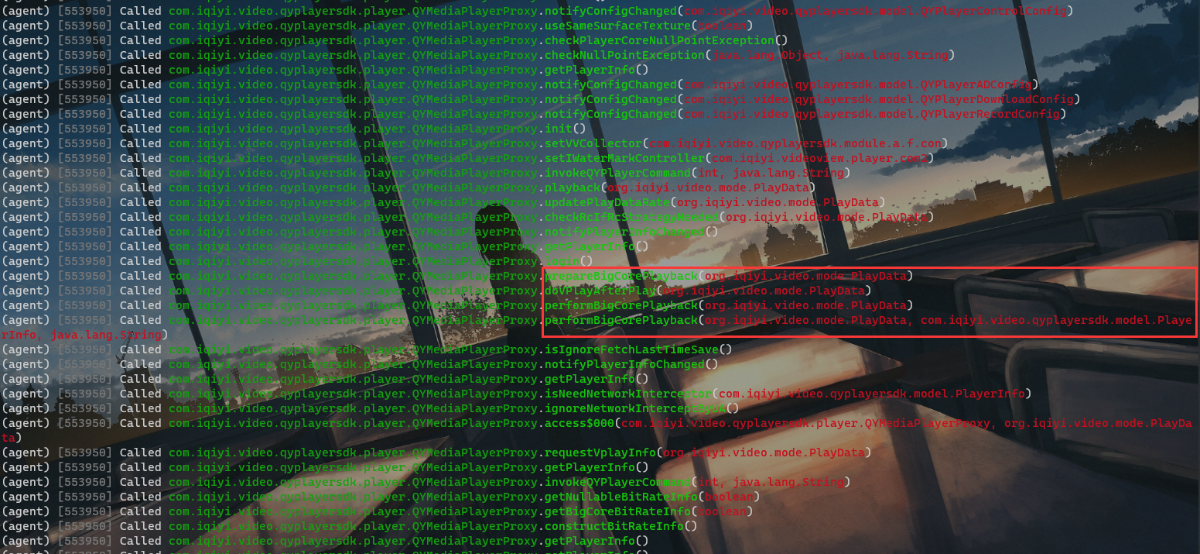
根据 hook 上层类的方法调用发现,QYMediaPlayerProxy 类中存在一些可能是与加载广告界面相关的函数。
截图202411211553174875.png
几个重要的函数分析:
  1. // setVVCollector():设置VVCollector,收集播放器的VV统计信息。
  2. // video view (VV),意思为视频播放次数,根据广告播放次数,统计盈利。
  3. public void setVVCollector(com.iqiyi.video.qyplayersdk.module.a.f.con conVar) {
  4.     com.iqiyi.video.qyplayersdk.module.a.aux auxVar = this.mStatistics;
  5.     if (auxVar != null) {
  6.         auxVar.setVVCollector(conVar);
  7.     }
  8. }
  9. // init(): 初始化播放器界面
  10. // 获取了mControlConfig中的一些配置信息,例如编解码类型、是否自动跳过片头片尾、色盲模式等,然后调用prn.aux构造方法创建一个prn对象,并设置这些配置信息,最后通过a()方法将prn对象和mPassportAdapter对象一起传入a方法中,完成播放器的初始化。
  11. public void init() {
  12.     this.mPlayerCore.a(new prn.aux(this.mControlConfig.getCodecType())
  13.             .eH(this.mControlConfig.isAutoSkipTitle())
  14.             .eI(this.mControlConfig.isAutoSkipTrailer())
  15.             .kR(this.mControlConfig.getColorBlindnessType())
  16.             .lX(this.mControlConfig.getExtendInfo())
  17.             .lY(this.mControlConfig.getExtraDecoderInfo())
  18.             .aie(), com.iqiyi.video.qyplayersdk.core.data.aux.a(this.mPassportAdapter));
  19. }
  20. // 检查 RC 策略是否需要执行
  21. // RC 策略是指在不同的地理位置或网络环境下,根据不同的版权限制或合作协议,播放不同的内容或提供不同的服务。
  22. public PlayData checkRcIfRcStrategyNeeded(PlayData playData) {
  23.     if (playData == null) {
  24.         com.iqiyi.video.qyplayersdk.g.aux.d(TAG, "QYMediaPlayerProxy checkRcIfRcStrategyNeeded source == null!");
  25.         return playData;
  26.     }
  27.     int rCCheckPolicy = playData.getRCCheckPolicy();
  28.     com.iqiyi.video.qyplayersdk.g.aux.d(TAG, "QYMediaPlayerProxy checkRcIfRcStrategyNeeded strategy == " + rCCheckPolicy);
  29.     if (this.mPlayerRecordAdapter == null) {
  30.         this.mPlayerRecordAdapter = new PlayerRecordAdapter();
  31.     }
  32.         // 根据 RCCheckPolicy (即 RC 策略) 的值。
  33.         // 如果值为 2,直接返回 playData;如果值为 1 或 0,,则调用 PlayerRecordAdapter 的 retrievePlayerRecord 方法,获取播放记录,
  34.     return rCCheckPolicy == 2 ? playData : (rCCheckPolicy == 1 || rCCheckPolicy == 0) ?
  35.         com.iqiyi.video.qyplayersdk.player.data.b.con.a(playData, this.mPlayerRecordAdapter.retrievePlayerRecord(playData)) : playData;
  36. }
  37. // 获取登录用户信息
  38. void login() {
  39.     IPassportAdapter iPassportAdapter;
  40.         // mPlayerCore 是播放器核心,mPassportAdapter 是用户身份验证适配器。
  41.     if (this.mPlayerCore == null || (iPassportAdapter = this.mPassportAdapter) == null) {
  42.         return;
  43.     }
  44.         // 判断是不是VIP用户,并获取相应用户信息
  45.     this.mPlayerCore.login(com.iqiyi.video.qyplayersdk.core.data.aux.a(iPassportAdapter));
  46. }
  47. // 准备播放器重要核心配置
  48. private void prepareBigCorePlayback(PlayData playData) {
  49.     boolean z;
  50.     org.qiyi.android.coreplayer.d.com7.beginSection("QYMediaPlayerProxy.prepareBigCorePlayback");
  51.         // 检查是否需要预加载
  52.         com.iqiyi.video.qyplayersdk.h.con conVar = this.mPreload;
  53.     if (conVar != null) {
  54.         conVar.aoj();
  55.     }
  56.         // 根据播放数据和控制配置,选择一个播放策略,根据策略选择对应操作
  57.     int a2 = com.iqiyi.video.qyplayersdk.player.data.b.nul.a(playData, this.mContext, this.mControlConfig);
  58.     com.iqiyi.video.qyplayersdk.g.aux.e("PLAY_SDK", "vplay strategy : " + a2);
  59.     switch (a2) {
  60.         case 1:
  61.             performBigCorePlayback(playData);
  62.             break;
  63.         case 2:
  64.             z = true;
  65.             doVPlayBeforePlay(playData, z);
  66.             break;
  67.         case 3:
  68.             doVPlayFullBeforePlay(playData);
  69.             break;
  70.         case 4:
  71.             doVPlayAfterPlay(playData);
  72.             break;
  73.         case 5:
  74.             if (com.iqiyi.video.qyplayersdk.g.aux.isDebug()) {
  75.                 throw new RuntimeException("address & tvid & ctype are null");
  76.             }
  77.             com.iqiyi.video.qyplayersdk.g.aux.e("PLAY_SDK", "address & tvid & ctype are null");
  78.             break;
  79.         case 6:
  80.             z = false;
  81.             doVPlayBeforePlay(playData, z);
  82.             break;
  83.     }
  84.     org.qiyi.android.coreplayer.d.com7.endSection();
  85. }
  86. // 视频播放结束后,继续获取视频的相关信息。
  87. public void doVPlayAfterPlay(final PlayData playData) {
  88.     performBigCorePlayback(playData);
  89.     lpt6 lpt6Var = this.mTaskExecutor;
  90.     if (lpt6Var != null) {
  91.         lpt6Var.q(new Runnable() { // from class: com.iqiyi.video.qyplayersdk.player.QYMediaPlayerProxy.1
  92.             @Override // java.lang.Runnable
  93.             public void run() {
  94.                 QYMediaPlayerProxy.this.requestVplayInfo(playData);
  95.             }
  96.         });
  97.     }
  98. }
  99. // 在获取视频源前获取一些与视频相关的信息
  100. private void doVPlayBeforePlay(PlayData playData, boolean z) {
  101.     VPlayParam a2 = com.iqiyi.video.qyplayersdk.player.data.b.con.a(playData, VPlayHelper.CONTENT_TYPE_PLAY_CONDITION, this.mPassportAdapter);
  102.     this.mVPlayHelper.cancel();
  103.         // 请求 VPlay 信息
  104.     this.mVPlayHelper.requestVPlay(this.mContext, a2, new aux(this, playData, this.mSigt, z), this.mBigcoreVplayInterceptor);
  105.     sendVPlayRequestPingback(true, playData, this.mSigt);
  106.     com.iqiyi.video.qyplayersdk.b.com3.b(playData);
  107.     com.iqiyi.video.qyplayersdk.g.aux.d("PLAY_SDK", TAG, " doVPlayBeforePlay needRequestFull=", Boolean.valueOf(z));
  108. }
  109. // 判断是否需要网络拦截
  110. private boolean isNeedNetworkInterceptor(PlayerInfo playerInfo) {
  111.         // 是否需要忽略用户代理的拦截
  112.     if (ignoreNetworkInterceptByUA()) {
  113.         com.iqiyi.video.qyplayersdk.g.aux.d("PLAY_SDK", TAG, "ignoreNetworkInterceptByUA ");
  114.         return false;
  115.     }
  116.         // 判断当前是否处于离线状态,并且要播放的视频是在线视频
  117.     boolean gW = org.iqiyi.video.l.aux.gW(this.mContext);
  118.     boolean D = com.iqiyi.video.qyplayersdk.player.data.b.nul.D(playerInfo);
  119.     if (gW && D) {
  120.                 // 获取当前的错误码版本号,根据不同的版本号来执行不同的逻辑
  121.         int errorCodeVersion = getErrorCodeVersion();
  122.         com.iqiyi.video.qyplayersdk.g.aux.d("PLAY_SDK", TAG, "isNeedNetworkInterceptor isOffNetWork = ", Boolean.valueOf(gW), " isOnLineVideo = ", Boolean.valueOf(D), " errorCodeVer = " + errorCodeVersion);
  123.                 if (errorCodeVersion == 1) {
  124.                         // 自定义错误码为900400的播放器错误
  125.             this.mInvokerQYMediaPlayer.onError(PlayerError.createCustomError(900400, "current network is offline, but you want to play online video"));
  126.             return true;    // 进行网络拦截
  127.         } else if (errorCodeVersion == 2) {
  128.                         // 返回错误码和错误信息
  129.             org.iqiyi.video.data.com7 bbQ = org.iqiyi.video.data.com7.bbQ();
  130.             bbQ.xC(String.valueOf(900400));
  131.             bbQ.setDesc("current network is offline, but you want to play online video");
  132.             this.mInvokerQYMediaPlayer.onErrorV2(bbQ);
  133.             return true;
  134.         }
  135.     }
  136.     return false;     // 不需要进行网络拦截
  137. }
  138. 我们重点分析 performBigCorePlayback 函数:
  139. // 执行播放器的核心播放功能
  140. private void performBigCorePlayback(PlayData playData, PlayerInfo playerInfo, String str) {
  141.     int i;
  142.         // 判断是否有自定义的播放拦截器(mDoPlayInterceptor),如果有且拦截器拦截了播放请求,则不播放视频。
  143.     com.iqiyi.video.qyplayersdk.f.con conVar = this.mDoPlayInterceptor;
  144.     if (conVar != null && conVar.e(playerInfo)) {
  145.         com.iqiyi.video.qyplayersdk.g.aux.d("PLAY_SDK", TAG, "DoPlayInterceptor is intercept!");
  146.         lpt5 lpt5Var = this.mInvokerQYMediaPlayer;
  147.         if (lpt5Var == null) {
  148.             return;
  149.         }
  150.         lpt5Var.amX();  
  151.         // 没有播放器信息,什么都不做
  152.     } else if (this.mPlayerInfo == null) {
  153.     }
  154.         // 重点
  155.         else {
  156.         org.qiyi.android.coreplayer.d.com7.beginSection("QYMediaPlayerProxy.performBigCorePlayback");
  157.                 // 通过判断播放数据(playData)是否为空以及是否存在播放地址,空则i = 0。
  158.         if (com.iqiyi.video.qyplayersdk.player.data.b.nul.A(playerInfo) || playData == null) {
  159.             i = 0;
  160.         } else {
  161.                         // 如果有地址,根据该数据生成CupidVvId,并将该ID与广告相关的Ad对象(mAd)绑定。
  162.                         // 所以这里就是去后台获取广告的id
  163.             com.iqiyi.video.qyplayersdk.cupid.data.model.com9 a2 = com.iqiyi.video.qyplayersdk.cupid.util.con.a(playData, playerInfo, false, this.mPlayerRecordAdapter, 0);
  164.             a2.eV(isIgnoreFetchLastTimeSave());
  165.             int generateCupidVvId = CupidAdUtils.generateCupidVvId(a2, playData.getPlayScene());
  166.             com.iqiyi.video.qyplayersdk.cupid.com4 com4Var = this.mAd;
  167.             if (com4Var != null) {
  168.                 com4Var.la(generateCupidVvId);    // 更新当前的广告ID
  169.             }
  170.             org.qiyi.android.coreplayer.d.aux.boe();
  171.             i = generateCupidVvId;
  172.         }
  173.                 // a3 存储广告信息
  174.         com.iqiyi.video.qyplayersdk.core.data.model.com1 a3 = com.iqiyi.video.qyplayersdk.core.data.a.aux.a(this.mSigt, i, playData, playerInfo, str, this.mControlConfig);
  175.         com.iqiyi.video.qyplayersdk.g.aux.d("PLAY_SDK", TAG, " performBigCorePlayback QYPlayerMovie=", a3);
  176.         this.mPlayerInfo = new PlayerInfo.Builder().copyFrom(playerInfo).extraInfo(new PlayerExtraInfo.Builder().copyFrom(playerInfo.getExtraInfo()).sigt(a3.getSigt()).build()).build();
  177.         // 通知播放器信息已更改(在这里是指开始播放广告)
  178.                 notifyPlayerInfoChanged();
  179.                 // 判断是否断网
  180.         if (!isNeedNetworkInterceptor(playerInfo)) {
  181.             if (playData == null || (TextUtils.isEmpty(playData.getPlayAddress()) && (TextUtils.isEmpty(playData.getTvId()) || "0".equals(playData.getTvId())))) {
  182.                 PlayerExceptionTools.report(0, 0.1f, "1", com.iqiyi.video.qyplayersdk.player.data.b.con.i(playData));
  183.             }
  184.             com.iqiyi.video.qyplayersdk.core.com1 com1Var = this.mPlayerCore;
  185.             if (com1Var != null) {
  186.                 com1Var.setVideoPath(a3);    // 设置广告url
  187.                 this.mPlayerCore.ahF();
  188.             }
  189.         }
  190.         org.qiyi.android.coreplayer.d.com7.endSection();
  191.     }
  192. }
  193. // 停止视频
  194. public void amX() {
  195.     d dVar = this.mQYMediaPlayer;
  196.     if (dVar != null) {
  197.         dVar.stopPlayback();
  198.     }
  199. }
  200. // 判断是否获取到视频
  201. public static boolean A(PlayerInfo playerInfo) {
  202.     return z(playerInfo) || y(playerInfo);
  203. }
  204. // 获取PlayerExtraInfo对象的播放地址和播放地址类型
  205. public static boolean z(PlayerInfo playerInfo) {
  206.     if (playerInfo == null || playerInfo.getExtraInfo() == null) {
  207.         return false;
  208.     }
  209.     PlayerExtraInfo extraInfo = playerInfo.getExtraInfo();
  210.     String playAddress = extraInfo.getPlayAddress();
  211.     int playAddressType = extraInfo.getPlayAddressType();
  212.     if (TextUtils.isEmpty(playAddress)) {
  213.         return false;
  214.     }
  215.     return playAddressType == 9 || playAddressType == 4 || playAddressType == 8;
  216. }
  217. // 判断是否有视频和专辑ID
  218. public static boolean y(PlayerInfo playerInfo) {
  219.     String s = s(playerInfo);     // 专辑ID
  220.     String u = u(playerInfo);     // 视频ID
  221.     if ((TextUtils.isEmpty(s) || TextUtils.equals(s, "0")) && !((!TextUtils.isEmpty(u) && !TextUtils.equals(u, "0")) || playerInfo == null || playerInfo.getExtraInfo() == null)) {
  222.         // 获取PlayerExtraInfo对象的播放地址和播放地址类型
  223.                 PlayerExtraInfo extraInfo = playerInfo.getExtraInfo();
  224.         return !TextUtils.isEmpty(extraInfo.getPlayAddress()) && extraInfo.getPlayAddressType() == 6;
  225.     }
  226.     return false;
  227. }
  228. // 获取专辑ID
  229. public static String s(PlayerInfo playerInfo) {
  230.     String id;
  231.     return (playerInfo == null || playerInfo.getAlbumInfo() == null || (id = playerInfo.getAlbumInfo().getId()) == null) ? "" : id;
  232. }
  233. // 获取视频ID
  234. public static String u(PlayerInfo playerInfo) {
  235.     String id;
  236.     return (playerInfo == null || playerInfo.getVideoInfo() == null || (id = playerInfo.getVideoInfo().getId()) == null) ? "" : id;
  237. }
  238. // 一个广告控制器方法,用于更新当前的CupidvvId
  239. public void la(int i) {
  240.         // col=0,则说明当前没有活跃的vvId,打印日志信息表示要更新当前的vvId
  241.     if (this.col.getAndIncrement() == 0) {
  242.         com.iqiyi.video.qyplayersdk.g.aux.i("PLAY_SDK_AD_MAIN", "{AdsController}", " update current cupid vvId. current doesn't has active vvId.");
  243.     } else {
  244.         com.iqiyi.video.qyplayersdk.g.aux.i("PLAY_SDK_AD_MAIN", "{AdsController}", " update current cupid vvId. but current has active vvId.");
  245.         // 将旧的vvId赋值给coh变量
  246.                 this.coh = this.coi;
  247.     }
  248.         // 将当前新的ID赋给coi
  249.     this.coi = i;
  250.     lc(i);
  251.     com5.aux auxVar = this.mQYAdPresenter;
  252.     if (auxVar != null) {
  253.         auxVar.lh(i);    // 为暂停播放函数与继续播放函数传递广告ID
  254.     }
  255. }
  256. /*
  257.         该方法用于注册广告委托和委托JSON,以展示广告
  258.         通过 qYPlayerADConfig3.checkRegister 方法判断是否需要注册广告
  259.         通过 Cupid.registerObjectAppDelegate 方法注册代理
  260.         广告类型包括:
  261.         中插广告(SlotType.SLOT_TYPE_BRIEF_ROLL)、
  262.         viewpoint广告(SlotType.SLOT_TYPE_VIEWPOINT)、
  263.         页面广告(SlotType.SLOT_TYPE_PAGE)等等
  264.         代码过长就不再此展示,需要请自行查看
  265. */
  266. private void lc(final int i) {
  267.     com.iqiyi.video.qyplayersdk.g.aux.d("PLAY_SDK_AD_CORE", "{AdsController}", "; registerCupidJsonDelegate vvId:", Integer.valueOf(i), "");
  268.         org.qiyi.android.coreplayer.d.aux.wr(com.qiyi.baselib.utils.d.nul.fJ(org.iqiyi.video.mode.com3.enn) ? 2 : 1);
  269.         ...
  270.         QYPlayerADConfig qYPlayerADConfig5 = this.cog;
  271.       if (qYPlayerADConfig5.checkRegister(256, qYPlayerADConfig5.getAddAdPolicy())) {
  272.           QYPlayerADConfig qYPlayerADConfig6 = this.cog;
  273.           if (!qYPlayerADConfig6.checkRegister(256, qYPlayerADConfig6.getRemoveAdPolicy())) {
  274.               Cupid.registerJsonDelegate(i, SlotType.SLOT_TYPE_VIEWPOINT.value(), this.cof);
  275.           }
  276.       }
  277.         ...
  278. }
复制代码
我们可以发现这个函数就是判断是否显示广告界面的函数,可以猜测只有当是VIP账户时,播放数据(playData)才为空,才会使 i = 0(广告ID为0)。

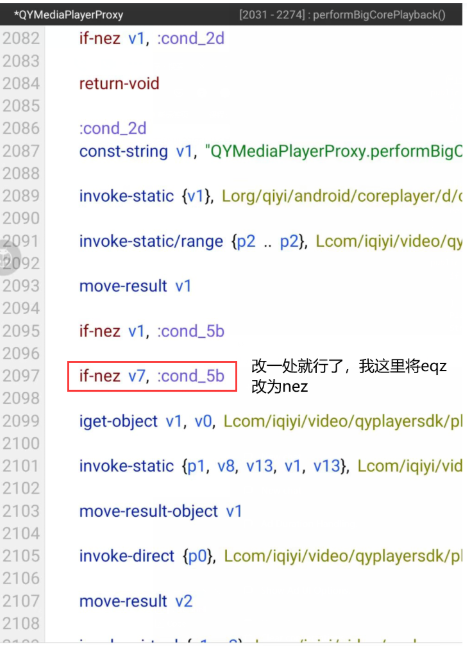
3.1.4 修改 if 判断
到这里我们就可以尝试进行破解了,将 if 判断修改,使之进入 i=0 的分支中。
截图202411211554016953.png
重打包编译签名,运行程序,已去除视频广告:
939796_7FN2CQE9RJZU87J.gif

3.2 总结
3.2.1 破解广告技巧
对于破解视频广告或其他广告,都可以通过获取广告的相关控件,分析函数的调用逻辑顺序,定位到关键类,分析类,找到关键函数。
针对复杂客户端,尽量不采用关键字搜索的方式去破解,因为复杂的客户端代码都是有设计思想的,并且大概率做了混淆,无法轻易通过关键字符串进行定位,可以尝试通过资源 ID 进行定位。
提高英文水平,如 player 代表播放器、Ad Duration 代表广告持续时间等,破解的首要任务就是看懂代码,特别是对于混淆过的代码,那些没有混淆过的函数名、变量名就是破解的关键,只有看懂才有机会能猜到关键点。
3.2.2 扩展:proxy代理类
分析代码后发现,广告的生成、调用、配置大部分都是在 QYMediaPlayerProxy 类中完成的,并且播放器的核心功能也有一部分在代理类中调用。

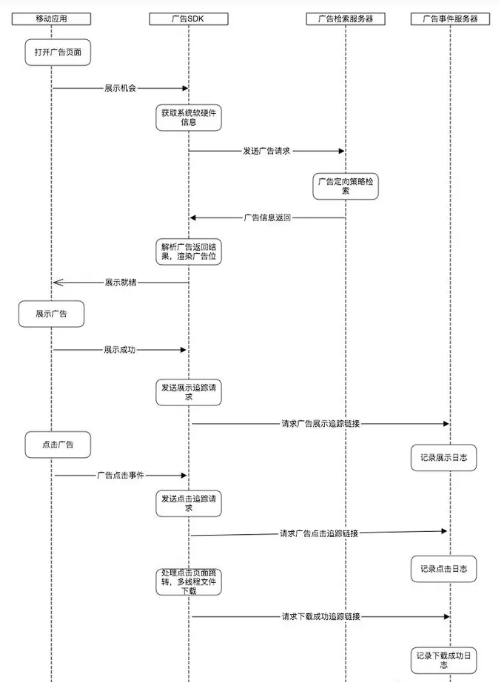
对于第三方SDK动态导入视频广告,通常会通过网络请求向广告服务器发送请求以获取广告,流程参考下方 android 广告 SDK 原理流程图,常用方法使通过动态代理,通过动态代理这样的方法有一定的好处:

可以过滤和控制广告流量,例如阻止一些恶意或不受欢迎的广告,以及提高广告访问速度和可靠性。
在特殊情况下,广告服务器可能会要求使用特定的代理服务器或 IP 地址进行广告请求。这时候,动态代理就可以被用来实现这些特殊的网络访问要求,确保广告请求能够成功发送和接收。
进一步分析,我们可以想到广告不太会是在软件刚出来时就加上,一定是后续附加上去的功能。后续除了广告之外肯定也会陆续附加其他功能,如何做到这些功能扩展呢?这就可以用 proxy 代理类了,将播放器核心功能(播放视频)融入到代理类中,让其负责对核心功能进行扩展(如在播放视频之前添加广告)。这样既方便后续软件更新,也会使逻辑更加清晰、出错时能快速定位。

android 广告 SDK 原理流程图

截图202411211554594855.png


评分

参与人数 1贡献 +20 收起 理由
logic + 20 适应于很多广告情况

查看全部评分

这个人还没有签名
logic | 2024-11-21 16:07:52 来自手机 | 显示全部楼层
🐂🍺 很详细
这个人还没有签名
JYAQ | 2024-11-22 00:37:12 来自手机 | 显示全部楼层
大佬是用什么工具或方式hook的那个类 那里我有点没看懂
这个人还没有签名
洋咩咩 | 2024-11-22 11:04:19 来自手机 | 显示全部楼层
JYAQ 发表于 2024-11-22 00:37
大佬是用什么工具或方式hook的那个类 那里我有点没看懂

内部提供的有呀 安卓追踪
这个人还没有签名
JYAQ | 2024-11-22 12:37:02 来自手机 | 显示全部楼层
洋咩咩 发表于 2024-11-22 11:04
内部提供的有呀 安卓追踪

好的 谢谢大佬
这个人还没有签名
asdfa01 | 2024-11-22 16:57:07 来自手机 | 显示全部楼层
不明觉厉啊,仔仔细细看也没看懂,你分析的很全面,但是我看不懂😭
这个人还没有签名
xiaohuo1251 | 2024-11-25 20:49:39 | 显示全部楼层
感谢大佬  多向大佬学习
这个人还没有签名
suifenginc | 2024-11-27 01:12:34 来自手机 | 显示全部楼层
非常详细啊
这个人还没有签名
asdfa01 | 2024-12-4 12:49:51 | 显示全部楼层
那要是小程序的软件怎么去除啊?
这个人还没有签名
1198189542 | 2024-12-7 13:11:15 来自手机 | 显示全部楼层
sdk广告我是去掉了 结果网连不上了
这个人还没有签名
您需要登录后才可以回帖 登录 | 立即注册

本版积分规则